Corsair K100 RGB vs SteelSeries Apex Pro TKL
Two of the most capable gaming keyboards you can buy — but they solve the "premium keyboard" problem differently. The K100 maxes out polling rate. The Apex Pro minimizes actuation. Here's how to decide.
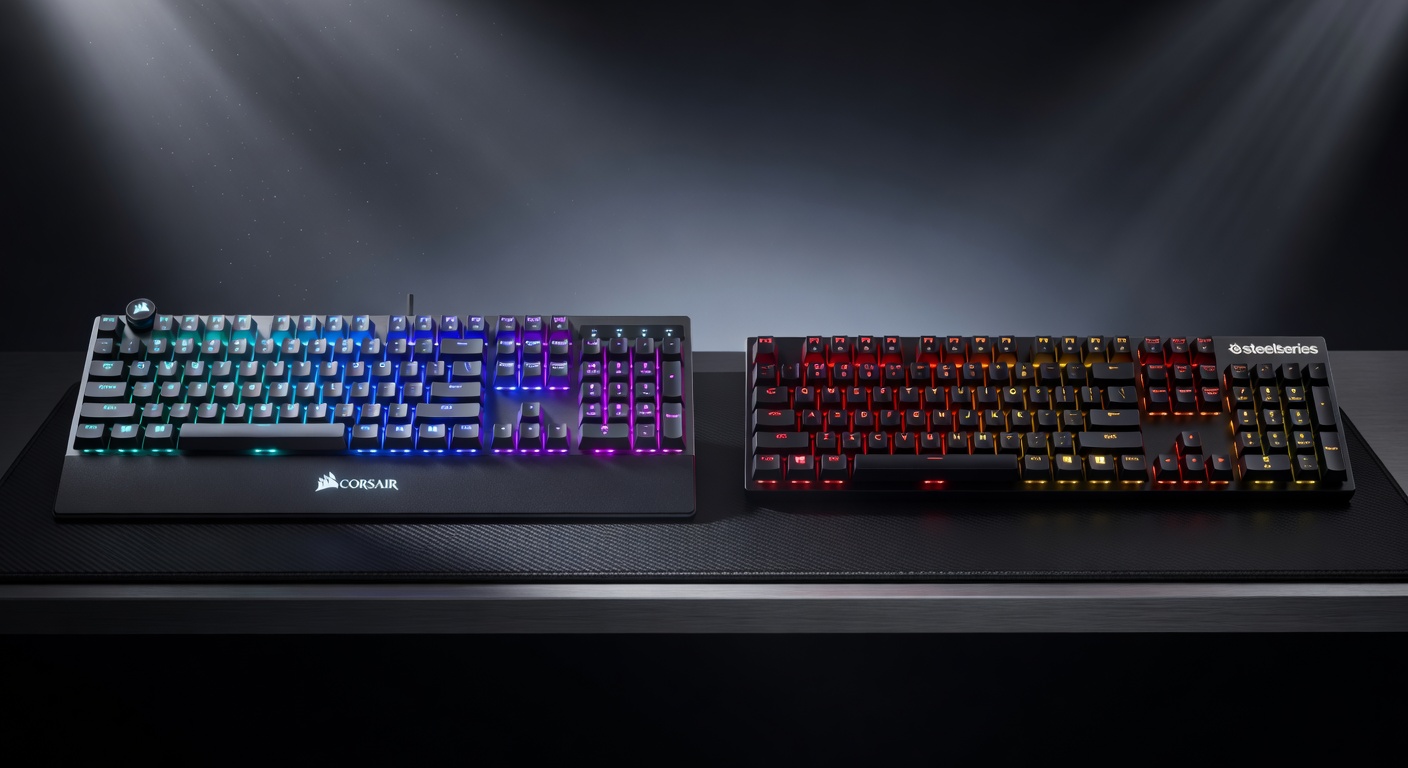
Full Specs Comparison
| Spec | Corsair K100 RGB | SteelSeries Apex Pro TKL |
|---|---|---|
| Switch Type | OPX Optical-Mechanical (linear) | OmniPoint 2.0 (Hall Effect analog) |
| Polling Rate | 8000Hz (AXON) | 1000Hz |
| Actuation Range | 1.0mm – 3.2mm | 0.2mm – 3.8mm |
| Actuation Force | 45g | 35g (at lowest) |
| Key Rollover | N-key, 100% anti-ghosting | N-key, 100% anti-ghosting |
| Layout | Full-size (with media keys) | TKL (compact) |
| Build | Brushed aluminum + PBT keycaps | Aircraft-grade aluminum + PBT |
| Connectivity | USB 3.0 (passthrough ports) | Detachable USB-C |
| Weight | 1.31 kg | 0.95 kg |
| Software | Corsair iCUE | SteelSeries GG |
| Price | $249.99 | $189.99 |
4 Key Differences
1. Polling Rate: 8000Hz vs 1000Hz
The K100 RGB uses Corsair's AXON Hyper-Processing to achieve an 8000Hz polling rate — every keystroke is registered 8 times per millisecond vs once per millisecond on the Apex Pro TKL. In practice, this means the K100's input lag is 0.125ms compared to 1ms. Whether this translates to a tangible competitive advantage depends on the player's skill level and the game. At top-tier competitive CS2 play, the difference is real. For most gamers, the Apex Pro's 1000Hz is more than sufficient.
2. Switch Technology: Optical vs Hall Effect Analog
These are fundamentally different switch designs. Corsair's OPX switches use light beam detection (optical) for instant actuation with no mechanical contact wear — no metal springs or contacts to degrade. SteelSeries' OmniPoint 2.0 uses Hall Effect (magnetic) sensing, which enables genuinely analog actuation control down to 0.2mm. The Apex Pro can be set to register at a barely perceptible whisper of a keypress. For FPS strafe movements, 0.2mm actuation enables faster directional changes than the K100's 1.0mm minimum.
3. Layout: Full-size vs TKL
The K100 is a full-size keyboard with a numpad, dedicated macro keys on the left side, a control dial, and media controls. If you use a numpad daily or bind lots of macro actions, the K100's layout is genuinely more useful. The Apex Pro TKL removes the numpad to give your mouse hand more room — for most FPS and gaming setups, that desk space translates directly to lower mouse DPI and larger sweep movements. The detachable USB-C cable on the Apex Pro is also a practical advantage for desk cable management.
4. Price: $249 vs $189 — is $60 worth it?
The K100's $60 premium buys you the 8000Hz polling rate and the full-size layout with media/macro controls. If neither of those things matters to your workflow, the Apex Pro TKL delivers comparable build quality (both use aluminum top plates and PBT keycaps) at a lower price with the practical advantages of TKL and detachable USB-C. The Apex Pro is not a "budget compromise" — it's genuinely excellent at $189.
Corsair K100 RGB — In Depth
The K100 RGB is Corsair's flagship and it shows in every part of the construction. The brushed aluminum frame has no flex. The OPX optical switches activate with a satisfying, immediate click that feels noticeably faster than standard mechanical switches. The control dial at the top left lets you adjust volume, scroll, zoom, or any assigned function without lifting your hand from the keyboard.
The 8000Hz AXON polling is the headline feature. Every gaming keystroke is processed 8× faster than a standard 1000Hz keyboard. For competitive FPS players, this is the keyboard equivalent of a 280Hz monitor over 60Hz — you're not imagining the difference, the hardware is genuinely faster. The USB 2.0 passthrough ports on the back are a practical quality-of-life addition for connecting a headset or flash drive.
SteelSeries Apex Pro TKL — In Depth
The Apex Pro TKL's defining feature is its OmniPoint 2.0 adjustable actuation. You open SteelSeries GG, set your preferred actuation point anywhere from 0.2mm to 3.8mm, and the switch physically responds to that setting via Hall Effect magnets. There's no calibration, no break-in period — the adjustment is immediate. Competitive players who set it to 0.2mm describe the keyboard as barely needing to be touched, which enables faster key cycling in rapid strafing or bunny hopping scenarios.
At 0.95 kg it's noticeably lighter than the K100, and the TKL form factor is the right choice for a gaming desk where mouse space matters. The detachable USB-C cable means no stress on the connector over time, and if you travel with your keyboard it's trivial to unplug. SteelSeries GG is a cleaner software experience than Corsair iCUE — faster to load, less resource-intensive.
Final Verdict
- You play competitive FPS and want the highest polling rate available
- You use a numpad daily or rely on macro keys for your workflow
- You want the iCUE ecosystem with tight Corsair peripheral integration
- The control dial for volume/media is appealing
- You want the lightest, most responsive actuation possible (0.2mm)
- Desk space matters — TKL gives your mouse more room
- You prefer detachable USB-C over fixed cable
- $189 vs $249 is meaningful and you don't need 8000Hz
Frequently Asked Questions
Is 8000Hz polling rate worth it over 1000Hz?
For most players, no. The difference between 1ms (1000Hz) and 0.125ms (8000Hz) latency is imperceptible in practice. Competitive FPS players at the highest levels sometimes report a smoother feel, but blind tests rarely support the claim. The K100's 8000Hz is a future-proofing feature and a marketing win. If you're a professional CS2 or Valorant player, it's worth considering. For everyone else, the Apex Pro's 1000Hz polling is more than sufficient.
What is the difference between optical switches and Hall Effect switches?
Optical switches (like the K100's OPX) use a light beam to detect actuation instead of a physical contact — eliminating debounce delay and mechanical wear. Hall Effect switches (like the Apex Pro's OmniPoint 2.0) use magnets and sense the position of the magnet continuously, enabling analog actuation with adjustable sensitivity down to 0.2mm. Both are faster than traditional mechanical switches, but Hall Effect enables features like Rapid Trigger (reset point equals release point, not a fixed reset distance) that optical switches cannot match.
Can I adjust the actuation point on the Corsair K100 RGB?
No. The K100 uses OPX optical switches with a fixed 1.0mm actuation point. The actuation point is not adjustable. If adjustable actuation is important to you (especially for FPS games where lower actuation = faster inputs), the SteelSeries Apex Pro's OmniPoint 2.0 Hall Effect switches allow you to set actuation anywhere from 0.2mm to 3.8mm per-key via SteelSeries GG software.
Is the Corsair K100 RGB worth its premium price?
It depends on what you value. The K100's aluminum construction, dedicated macro dial, and 8000Hz polling are genuinely premium. If you want a full-size keyboard with media controls, programmable macros, and a premium build that will last years, the K100 justifies its price. If your priority is competitive performance and per-key adjustability, the Apex Pro TKL gives you more typing adaptability at roughly the same price in a smaller, desk-friendly form factor.
Which keyboard is better for typing and productivity?
The Corsair K100 RGB edges ahead for long-form typing. The OPX optical switches have a smooth linear feel that many typists prefer. The full-size layout with dedicated numpad and media controls is convenient for productivity. The Apex Pro TKL's OmniPoint switches can be set for a heavier feel to reduce accidental keypresses during typing — with the right software tuning, it also works well. The TKL layout saves desk space but sacrifices the numpad.